 Pages Before Pixels
Gather and organise your content before you build
Last reviewed
The short version
- Make a list with one row per page.
- For each page, note the words, pictures and files it needs.
- Collect everything in one folder before you start building.
Why gather first
MDN's beginner course says it's good to start putting together the content that will appear on your page.[1] Doing it before you build has a practical payoff. You find the gaps while they're still cheap to fix.
Without a list, you hit the gaps in the middle of building. The price list isn't finished. The photo is blurry. Nobody has written the about page.
Make a content list
A content list is a table. The idea comes from content inventories, which simply log what is on a website.[2] A spreadsheet is the preferred tool for those.[2] A sheet of paper does the job as well.
Make one row for every page in your sitemap. Use these columns:
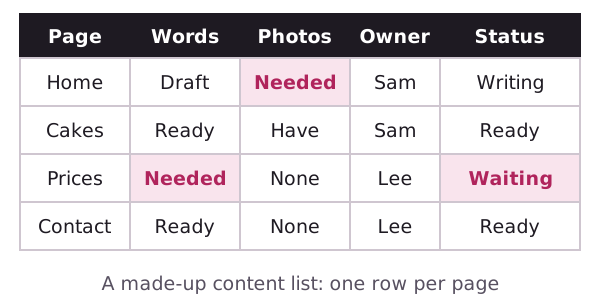
Wikipedia's list of inventory columns includes a content owner, the person responsible for maintaining page content.[2] It also suggests a page status, such as planned, being written, in review or ready.[2] You can borrow both.
Use the status column to see at a glance what's still missing.
Who supplies what
For each missing piece, write a name and a date. "Photos of cakes: Sam, by Friday." Without a name, nothing happens.
If you're working alone, you're the name on every row. That's fine. Dates still help.
Check the rights
Before you save an image, think about who owns it. MDN notes that most images on the web are copyrighted.[1] Fonts need care too. Many are protected by licences, so you can't necessarily use them freely on a commercial site.[1]
Photos you take yourself are the safest. Write down where each outside image or font came from, and what permission you have.
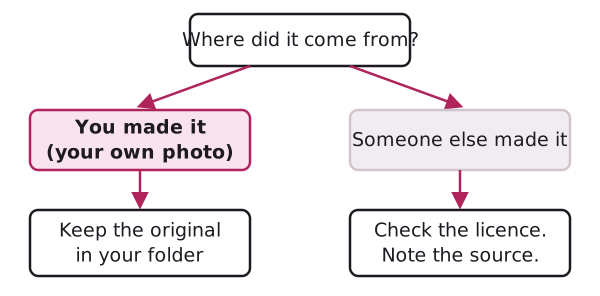
This guide can't give legal advice. If you're unsure, ask the owner or the licence page.
Set up one folder
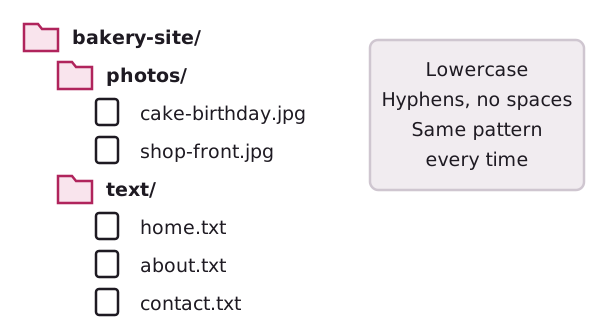
Keep all the files for one site in a single folder.[3] Inside it, make a subfolder for each kind of file, or for each page.
Name files carefully
Stick to numbers and letters, at least to begin with.[3] Spaces can cause bugs, because web servers usually swap them for %20 in addresses.[3] So birthday-cake.jpg is safer than Birthday Cake.jpg.
Pick a pattern and keep to it. Lowercase words joined by hyphens work well.
You're ready to build
Look at what you now have: a purpose sentence, a sitemap, a menu, sketches, draft copy and a tidy folder. That's a solid plan.
Open your builder or hand the stack to a designer. Anyone can pick it up and start.
Sources
- What will your website look like?, MDN Web Docs (accessed 2026-11-01)
- Content inventory, Wikipedia (accessed 2026-11-01)
- Dealing with files, MDN Web Docs (accessed 2026-11-01)