 Pages Before Pixels
Draw a sitemap of the pages you need
Last reviewed
The short version
- A sitemap is a list of your pages, drawn as a tree.
- Make one on sticky notes or index cards.
- Start with the home page, then add the pages that sit under it.
What a sitemap is
A site map, or sitemap, is a list of the pages of a website.[1] People use the word for three different things. One of them is a plan made while the site is being designed.[1]
That's the one we want here. It's your plan on paper.
The other two are lists for visitors to read, and files for search engines.[1] They come later. Here is how the three differ.
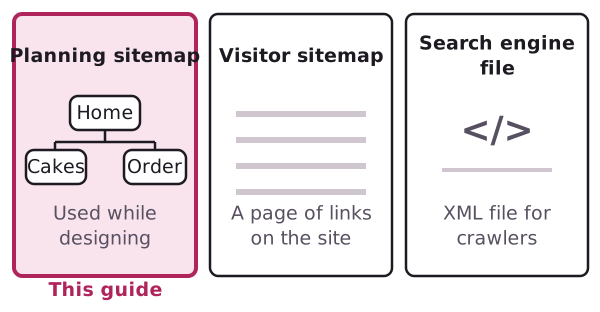
The search engine kind is a structured file called an XML Sitemap.[1] You don't need to think about it yet.
Make it with sticky notes
You need a pack of sticky notes or index cards. Paper works as well.
- Write one page per note. Think of every page the site might have. Don't judge yet.
- Check each note. Does it help with a task from step 1? If not, put it in a "maybe later" pile.
- Group the notes. Put similar ones side by side. Cakes with cakes. Contact details with ordering.
- Pick a name for each group. That name may become a page of its own.
- Stick the home page at the top. Hang the groups under it.
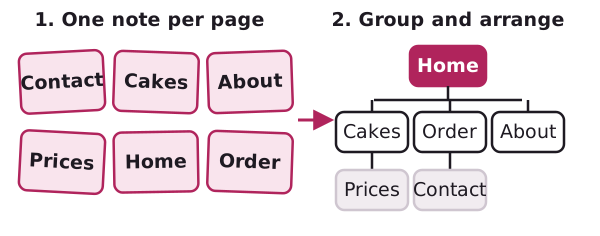
Move notes around until it feels right. That's the whole point of using notes.
An example
Here's a made-up sitemap for a small bakery at example.com. It's not a real business.
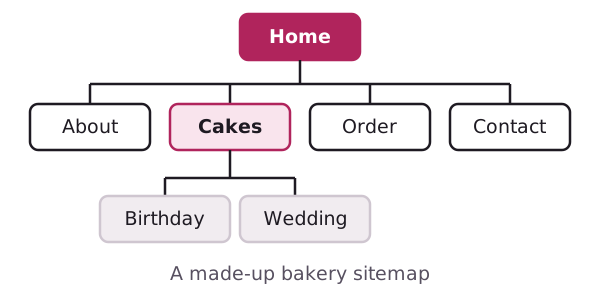
Home sits at the top. Each row below it is one step further away. Cakes has two pages under it. Order and Contact sit next to each other because people often go from one to the other.
Put the important things first
Digital.gov advises putting the most important information at the beginning.[2] It also says to put general information first, and the exceptions later.[2]
On a sitemap, that means the pages most visitors need go high up and near the left. Rare cases go further down.
A good test: can you reach every page in a few clicks from home? If a page is buried five levels down, move it up or rethink the group.
A word on "information architecture"
You may read this phrase in design books. It means the structural design of an information space, such as the organisation of a website.[3] It's about making things easy to find and use.[3]
Drawing a sitemap is a small piece of that. You're doing information architecture already. You just didn't need the name.
Keep it small
Don't plan fifty pages for a first site. Draw the pages you need to meet your goal. You can add more later, and the sitemap will tell you where they go.
Next, turn the top row into a menu.
Sources
- Site map, Wikipedia (accessed 2026-11-01)
- Organize the information, Digital.gov (US General Services Administration) (accessed 2026-11-01)
- Information architecture, Wikipedia (accessed 2026-11-01)